> ## Documentation Index
> Fetch the complete documentation index at: https://newscatcherinc-docs.mintlify.site/docs/llms.txt
> Use this file to discover all available pages before exploring further.
# Request tracing with correlation IDs
> Learn how to use correlation IDs to debug and troubleshoot API requests
In a distributed system like NewsCatcher, tracing requests across multiple
services is essential for effective troubleshooting. This guide explains how
correlation IDs work and how to use them to resolve issues quickly.
## What is a correlation ID?
A correlation ID is a unique identifier assigned to every request that enters
our system. This ID follows the request through all microservices and appears in
logs across our infrastructure, enabling end-to-end request tracing.
Think of a correlation ID as a tracking number for your API request - it lets
you and our support team follow the request's journey through our entire
system.
In the NewsCatcher APIs, correlation IDs appear in:
* HTTP response headers as `correlation-id`
* Internal logs across our Kubernetes infrastructure
* Error tracking systems
## Why correlation IDs matter
### Faster support resolution
When reporting issues to our support team, including the correlation ID allows
us to immediately locate all relevant logs and trace the exact path your request
took through our systems. This dramatically speeds up troubleshooting and
resolution times.
### End-to-end request visibility
In complex operations that touch multiple services (search, filtering,
aggregation, etc.), correlation IDs let us reconstruct the complete journey of
your request and identify exactly where problems occurred.
### Performance analysis
For requests with unexpected latency, correlation IDs help us analyze and
optimize performance by measuring exactly how long each step in processing took.
## How to use correlation IDs
Every response from the NewsCatcher API includes a `correlation-id` in the HTTP headers. You can view this:
* In your HTTP client's response headers
* In programming language responses by accessing the headers collection
* In Postman under the **Headers** tab of the response
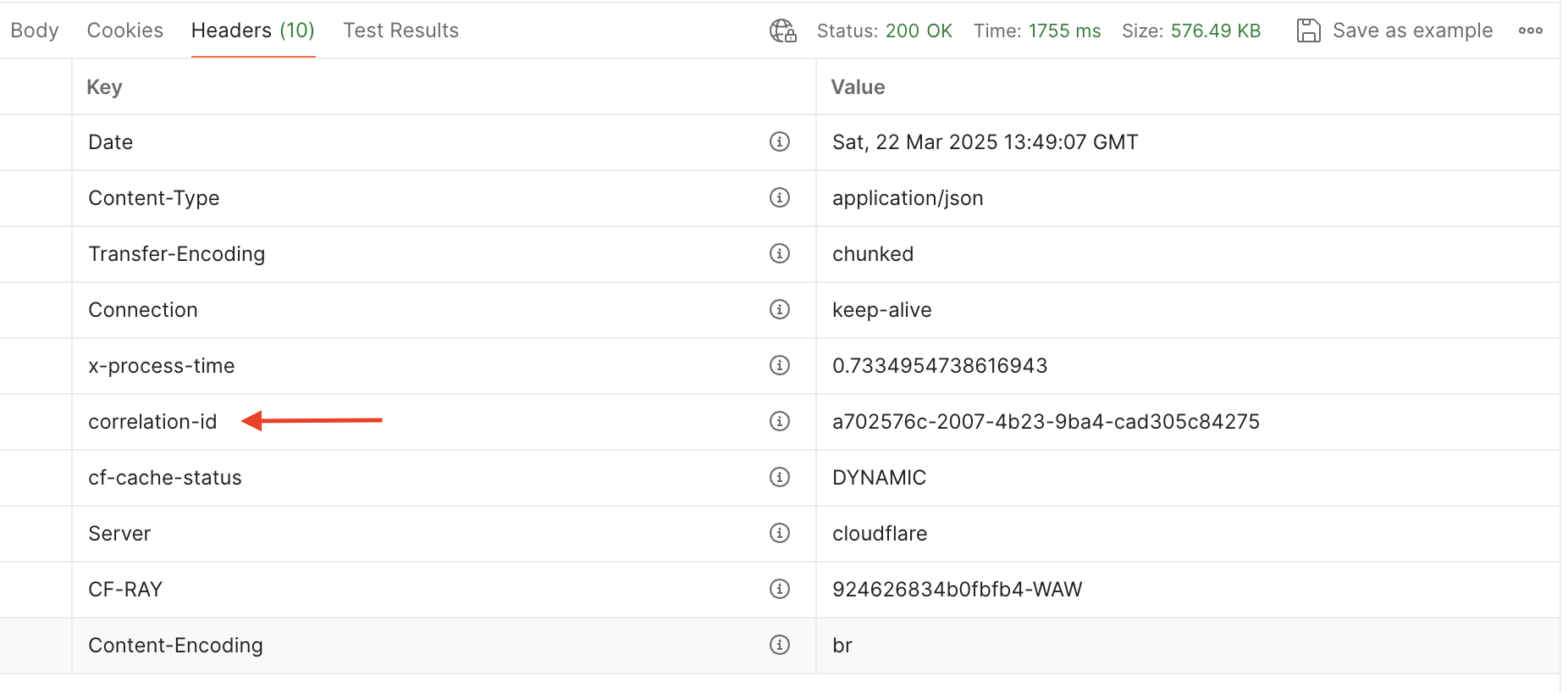 Example correlation ID: `a702576c-2007-4b23-9ba4-cad305c84275`
When contacting our support team about an API issue, always include:
* The complete correlation ID from the response headers
* The approximate time the request was made
* A brief description of the expected vs. actual behavior
This information lets us immediately locate the exact request in our logs and
provide faster assistance.
Without the correlation ID, debugging process would require much more
back-and-forth and manual searching through logs.
## How to extract correlation ID
Here's how to access the `correlation-id` header in each supported language:
```bash cURL theme={null}
curl -X POST "https://v3-api.newscatcherapi.com/api/search" \
-H "x-api-token: YOUR_API_KEY" \
-H "Content-Type: application/json" \
-d '{"q": "bitcoin", "from_": "30d"}' \
-i
# The -i flag includes response headers in the output.
# Look for: correlation-id: 2697cebe-6f5c-46e0-9b99-81e8abe55522
```
```python Python theme={null}
from newscatcher import NewscatcherApi
client = NewscatcherApi(api_key="YOUR_API_KEY")
response = client.search.post(q="bitcoin", from_="30d")
# The SDK exposes raw response headers via the underlying HTTP response.
# Use the requests library directly to access headers:
import requests
raw = requests.post(
"https://v3-api.newscatcherapi.com/api/search",
headers={"x-api-token": "YOUR_API_KEY", "Content-Type": "application/json"},
json={"q": "bitcoin", "from_": "30d"},
)
correlation_id = raw.headers.get("correlation-id")
print(f"Correlation ID: {correlation_id}")
```
```typescript TypeScript theme={null}
import { NewscatcherApiClient } from "newscatcher-sdk";
const client = new NewscatcherApiClient({ apiKey: "YOUR_API_KEY" });
// Use fetch directly to access response headers
const response = await fetch("https://v3-api.newscatcherapi.com/api/search", {
method: "POST",
headers: {
"x-api-token": "YOUR_API_KEY",
"Content-Type": "application/json",
},
body: JSON.stringify({ q: "bitcoin", from_: "30d" }),
});
const correlationId = response.headers.get("correlation-id");
console.log(`Correlation ID: ${correlationId}`);
```
```java Java theme={null}
import java.net.URI;
import java.net.http.HttpClient;
import java.net.http.HttpRequest;
import java.net.http.HttpResponse;
HttpClient httpClient = HttpClient.newHttpClient();
HttpRequest request = HttpRequest.newBuilder()
.uri(URI.create("https://v3-api.newscatcherapi.com/api/search"))
.header("x-api-token", "YOUR_API_KEY")
.header("Content-Type", "application/json")
.POST(HttpRequest.BodyPublishers.ofString("{\"q\": \"bitcoin\", \"from_\": \"30d\"}"))
.build();
HttpResponse response = httpClient.send(
request, HttpResponse.BodyHandlers.ofString()
);
String correlationId = response.headers().firstValue("correlation-id").orElse("not found");
System.out.println("Correlation ID: " + correlationId);
```
## Correlation IDs and support SLAs
Providing a correlation ID when reporting issues helps meet SLA support response
times, with target response times based on the following issue priority:
* Priority 1 (Critical): 1 hour
* Priority 2 (Significant): 4 hours
* Priority 3 (Moderate): 12 hours
* Priority 4 (Minor): 1 business day
Without a correlation ID, troubleshooting takes significantly longer, which may
impact our ability to meet these response targets. For the fastest possible
resolution, always include the correlation ID from the relevant API request when
contacting support.
For Priority 1 issues (complete service unavailability), please contact
support by phone at +33625707180 in addition to submitting a ticket with the
correlation ID to ensure immediate attention.
## Best practices
Always include correlation IDs in your own application logs when making
requests to our APIs.
Always include correlation IDs when reporting issues to our support team.
Integrate correlation ID extraction into your application's error handling
logic.
Consider storing correlation IDs for important requests temporarily for
easier troubleshooting.
## See also
* [Error handling](/news-api/troubleshooting/error-handling)
* [Report bugs](/news-api/troubleshooting/report-bugs)
* [API error codes](/news-api/api-reference/errors)
Example correlation ID: `a702576c-2007-4b23-9ba4-cad305c84275`
When contacting our support team about an API issue, always include:
* The complete correlation ID from the response headers
* The approximate time the request was made
* A brief description of the expected vs. actual behavior
This information lets us immediately locate the exact request in our logs and
provide faster assistance.
Without the correlation ID, debugging process would require much more
back-and-forth and manual searching through logs.
## How to extract correlation ID
Here's how to access the `correlation-id` header in each supported language:
```bash cURL theme={null}
curl -X POST "https://v3-api.newscatcherapi.com/api/search" \
-H "x-api-token: YOUR_API_KEY" \
-H "Content-Type: application/json" \
-d '{"q": "bitcoin", "from_": "30d"}' \
-i
# The -i flag includes response headers in the output.
# Look for: correlation-id: 2697cebe-6f5c-46e0-9b99-81e8abe55522
```
```python Python theme={null}
from newscatcher import NewscatcherApi
client = NewscatcherApi(api_key="YOUR_API_KEY")
response = client.search.post(q="bitcoin", from_="30d")
# The SDK exposes raw response headers via the underlying HTTP response.
# Use the requests library directly to access headers:
import requests
raw = requests.post(
"https://v3-api.newscatcherapi.com/api/search",
headers={"x-api-token": "YOUR_API_KEY", "Content-Type": "application/json"},
json={"q": "bitcoin", "from_": "30d"},
)
correlation_id = raw.headers.get("correlation-id")
print(f"Correlation ID: {correlation_id}")
```
```typescript TypeScript theme={null}
import { NewscatcherApiClient } from "newscatcher-sdk";
const client = new NewscatcherApiClient({ apiKey: "YOUR_API_KEY" });
// Use fetch directly to access response headers
const response = await fetch("https://v3-api.newscatcherapi.com/api/search", {
method: "POST",
headers: {
"x-api-token": "YOUR_API_KEY",
"Content-Type": "application/json",
},
body: JSON.stringify({ q: "bitcoin", from_: "30d" }),
});
const correlationId = response.headers.get("correlation-id");
console.log(`Correlation ID: ${correlationId}`);
```
```java Java theme={null}
import java.net.URI;
import java.net.http.HttpClient;
import java.net.http.HttpRequest;
import java.net.http.HttpResponse;
HttpClient httpClient = HttpClient.newHttpClient();
HttpRequest request = HttpRequest.newBuilder()
.uri(URI.create("https://v3-api.newscatcherapi.com/api/search"))
.header("x-api-token", "YOUR_API_KEY")
.header("Content-Type", "application/json")
.POST(HttpRequest.BodyPublishers.ofString("{\"q\": \"bitcoin\", \"from_\": \"30d\"}"))
.build();
HttpResponse response = httpClient.send(
request, HttpResponse.BodyHandlers.ofString()
);
String correlationId = response.headers().firstValue("correlation-id").orElse("not found");
System.out.println("Correlation ID: " + correlationId);
```
## Correlation IDs and support SLAs
Providing a correlation ID when reporting issues helps meet SLA support response
times, with target response times based on the following issue priority:
* Priority 1 (Critical): 1 hour
* Priority 2 (Significant): 4 hours
* Priority 3 (Moderate): 12 hours
* Priority 4 (Minor): 1 business day
Without a correlation ID, troubleshooting takes significantly longer, which may
impact our ability to meet these response targets. For the fastest possible
resolution, always include the correlation ID from the relevant API request when
contacting support.
For Priority 1 issues (complete service unavailability), please contact
support by phone at +33625707180 in addition to submitting a ticket with the
correlation ID to ensure immediate attention.
## Best practices
Always include correlation IDs in your own application logs when making
requests to our APIs.
Always include correlation IDs when reporting issues to our support team.
Integrate correlation ID extraction into your application's error handling
logic.
Consider storing correlation IDs for important requests temporarily for
easier troubleshooting.
## See also
* [Error handling](/news-api/troubleshooting/error-handling)
* [Report bugs](/news-api/troubleshooting/report-bugs)
* [API error codes](/news-api/api-reference/errors)