

How it works
A skill file is a Markdown document the agent reads as instructions. When the agent is connected to the CatchAll MCP server (the preferred path for MCP-based skills), it uses the skill to decide which MCP tool to call, how to construct queries, and how to present results — no additional tooling required.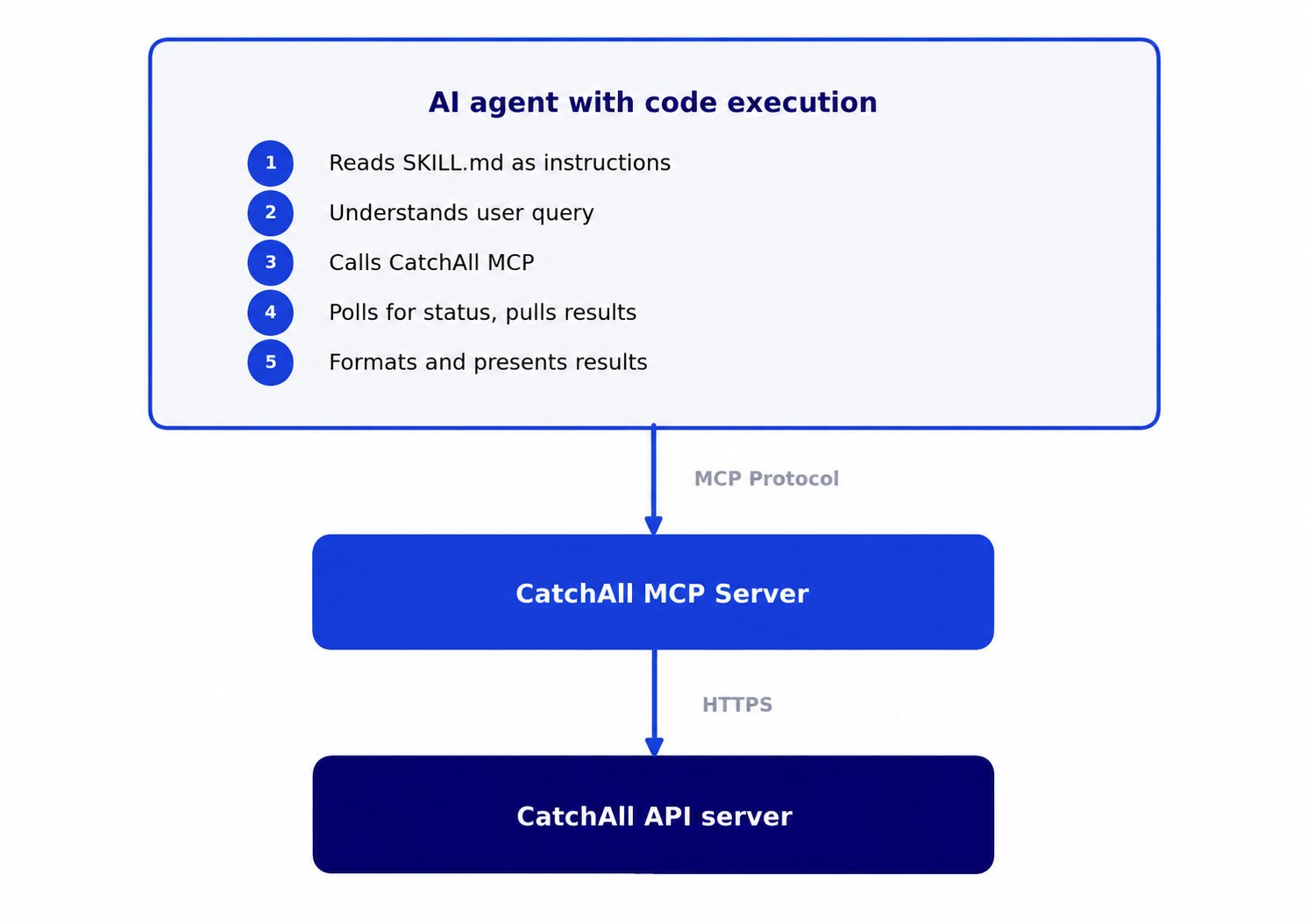
Before you start
- A CatchAll API key from platform.newscatcherapi.com
- The CatchAll MCP server connected to your agent — see the MCP integration page for setup instructions
- An AI agent with Markdown instruction support (Claude, an OpenAI Assistant, a LangChain agent, or any custom runtime with a configurable system prompt)
Set up
How you load a skill depends on your agent platform. The core requirement is the same: the agent must be able to read the skill’sSKILL.md and its
reference files, and have access to your API key.
- Claude
- Python agent (any LLM)
Claude Code and Claude Desktop — copy the skill folder into your
project’s Claude.ai — zip the skill folder and upload it via the Skills feature
at claude.ai/customize/skills.Upload the
.claude/skills/ directory, or reference the folder path
directly when starting a conversation..zip via + → Upload a skill on the Skills page.Skills
Browse the available skills below. Each one is a self-contained folder in the integrations repository.General Use Case
The foundation skill for the full CatchAll platform surface. Use it for any task not covered by a dedicated skill — or when the user needs direct control over validators, enrichments, watchlists, webhooks, or delivery setup. Main use case: Search, extract, and monitor any real-world event from the web — jobs, recurring event monitors, Slack alerts, company monitors, and more — without writing a single API call. Interface: MCP (https://catchall-mcp.newscatcherapi.com/mcp) · Folder:
skills/general-use-case
general-use-case
SKILL.md
references
VALIDATORS.md
MONITOR-SCHEDULING.md
Example prompts
Find EU regulatory fines on Big Tech companies in the last 30 days, limit 20.
Set up a weekly Slack alert every Monday at 9 AM UTC for new AI model releases.
Track these 10 competitors and alert me whenever any of them raises funding.
How many credits do I have left?
Competitor Snapshot
Produces a structured digest of a competitor’s recent moves across the categories competitive intelligence teams actually use: product launches, pricing changes, leadership moves, customer wins, partnerships, M&A activity, and financial signals. Works on a single competitor or a watchlist of up to 100 companies. Main use case: Get a complete, structured picture of what a named company — or a list of companies — has been doing recently, across seven intelligence categories, without manually scanning dozens of sources. Interface: MCP (https://catchall-mcp.newscatcherapi.com/mcp) · Folder:
skills/competitor-snapshot-catchall
competitor-snapshot-catchall
SKILL.md
references
QUERY-REVIEW.md
JOB-LIFECYCLE.md
OUTPUT-REPORT.md
NEXT-STEPS.md
CONCURRENCY.md
COMPANY-WATCHLIST.md
Example prompts
Snapshot Atlassian over the last 30 days.
What’s Salesforce been up to this month?
Give me a competitive brief on Notion, Linear, and Jira for the last 14 days.
Fundraising
Finds confirmed funding announcements across any geography, stage, and industry vertical. Returns structured event records, not raw links or article summaries. Main use case: Build prospect lists, track deal flow, or monitor market activity around funding rounds — driven by structured event extraction, not keyword search. Interface: MCP (https://catchall-mcp.newscatcherapi.com/mcp) · Folder:
skills/fundraising-catchall
fundraising-catchall
SKILL.md
references
JOB-LIFECYCLE.md
OUTPUT-ARTIFACTS.md
OUTPUT-LIST.md
QUERY-REVIEW.md
NEXT-STEPS.md
scripts
build_downloads.py
Example prompts
Series B raises in Austin last 30 days.
Which AI startups raised seed funding in Europe this month?
Find all funding rounds over $50M in the US in the last 30 days.
Who got funded in fintech globally last 2 weeks?
Mergers & Acquisitions
Finds confirmed M&A deals — acquisitions, mergers, asset purchases, and acqui-hires — across any geography and industry. Returns structured event records with deal type, both parties, deal value where disclosed, and deal status. Main use case: Track deal activity for competitive intelligence, GTM targeting of recently-acquired companies, or ongoing market monitoring — all from a single natural language query. Interface: MCP (https://catchall-mcp.newscatcherapi.com/mcp) · Folder:
skills/m&a-catchall
m&a-catchall
SKILL.md
references
JOB-LIFECYCLE.md
OUTPUT-ARTIFACTS.md
OUTPUT-LIST.md
QUERY-REVIEW.md
NEXT-STEPS.md
scripts
build_downloads.py
Example prompts
AI companies acquired in the US last 30 days.
Fintech mergers announced in Europe this month.
Which healthtech startups were acquired in the last 14 days?
PE acquisitions in enterprise SaaS globally last 30 days.
VC Pack
Combines funding and M&A activity into a single interactive dashboard for a given market segment. Runs two parallel CatchAll jobs — one for funding rounds, one for acquisitions — and renders them together with aggregated KPIs, deal stage breakdowns, sub-sector distribution, and live FX conversion. Main use case: Get a complete capital flow view of a market in one run — where money is entering (funding) and where ownership is consolidating (M&A) — without manually combining two separate reports. Interface: MCP (https://catchall-mcp.newscatcherapi.com/mcp) · Folder:
skills/vc-pack-catchall
vc-pack-catchall
SKILL.md
assets
render.py
dashboard.html
references
EXTRACTION.md
JOB-LIFECYCLE.md
NEXT-STEPS.md
CONCURRENCY.md
QUERY-REVIEW.md
scripts
render.py
Example prompts
VC pack for fintech last 30 days.
Funding and M&A in cybersecurity US last 2 weeks.
Capital activity in healthcare AI this month.
Where is money moving in climate tech globally?
Have another use case in mind?
Feel free to share it margaretha@newscatcherapi.com and we will build it for you!See also
Write effective queries
Get better results from CatchAll jobs
API reference
Full endpoint documentation
Claude integration
MCP server setup and Python agent examples for Claude
Skills source
All skills and reference files on GitHub