

Before you start
Before you begin, make sure you have:- n8n instance (Cloud or self-hosted)
- CatchAll API key (obtain from platform.newscatcherapi.com)
Install community node
- n8n Cloud
- Self-hosted
1
Open nodes panel
In any workflow, click
+ or press Tab to open the nodes panel.2
Search for node
In the search field, type “Newscatcher CatchAll”.
3
Install from search results
Click on the Newscatcher CatchAll node that appears in search results, then click Install.
4
Wait for installation
Installation takes a few seconds. Once complete, the node is available to add to your workflows.
If the node doesn’t appear in search, it may not yet be available on Cloud. Use a self-hosted n8n instance as an alternative.
Configure API key
Enter your API key directly in each node’s API Key field. There is no shared credentials dropdown.1
Add CatchAll node
In the nodes panel, search for “Newscatcher CatchAll” and add it to your workflow.
2
Enter API key
In the Parameters tab, paste your CatchAll API key into the API Key field.
Available operations
The CatchAll node supports three operations:| Operation | Description | Endpoint |
|---|---|---|
Submit | Create a new CatchAll job | /catchAll/submit |
Status | Check job processing progress | /catchAll/status/{job_id} |
Pull | Retrieve completed job results | /catchAll/pull/{job_id} |
Create your first workflow
This workflow submits a CatchAll job, polls until completion, retrieves results and send an email.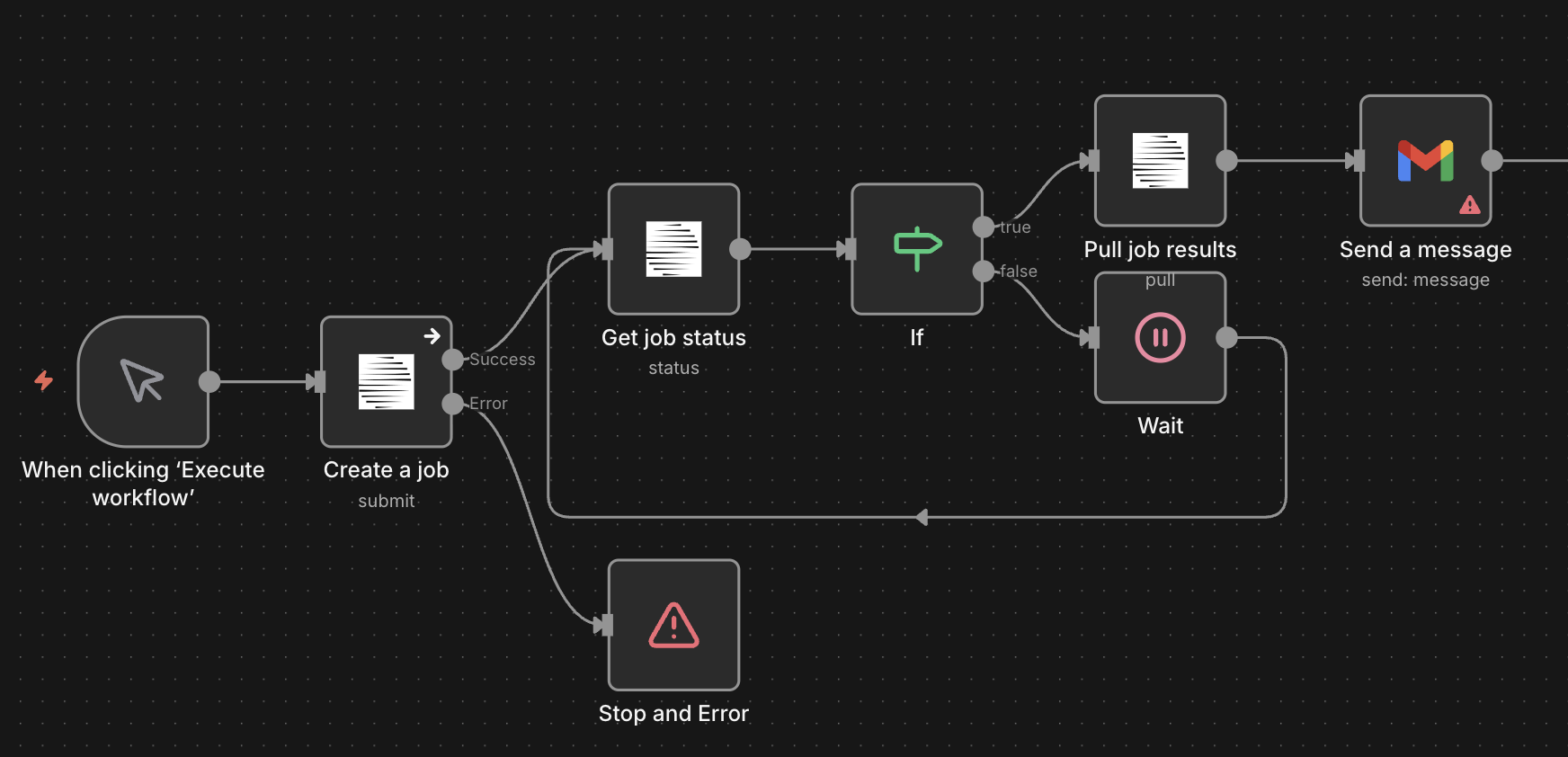
Want to skip manual setup? Import the CatchAll job demo workflow directly into your n8n instance.
1
Add trigger
Add a When clicking ‘Execute workflow’ trigger node to start the workflow manually.
2
Submit job
Add a Newscatcher CatchAll node with these settings:
- API Key: Your CatchAll API key
- Operation:
Submit - Query: Natural language question describing what to find.
- Context (optional): Additional context to focus on specific aspects of your query.
- Schema (optional): Template string to guide record summary formatting.
job_id for the next steps.3
Check job status
Add another Newscatcher CatchAll node:
- API Key: Your CatchAll API key
- Operation:
Status - Job ID:
{{ $json.job_id }}
steps array.4
Add node for polling
Add an If node to check if the job is complete:Condition:Set to:
is trueThis checks if either:- Step 6 (status: “completed”) is done > job succeeded
- Step 7 (status: “failed”) is done > job failed
5
Add Wait node (False branch)
Connect the False output of the If node to a Wait node:
- Resume: After Time Interval
- Wait Time: 30 seconds
6
Pull results (True branch)
Connect the True output of the If node to a final Newscatcher CatchAll node:
- API Key: Your CatchAll API key
- Operation:
Pull - Job ID:
{{ $('Create a job').item.json.job_id }}
7
Send a message
Add the Gmail > Send a message node and configure it to authenticate and send job results.
Jobs typically complete in 10-15 minutes. The polling loop checks status every
30 seconds. Adjust the wait time based on your needs (30-60 seconds
recommended).
For support, contact support@newscatcherapi.com with your n8n version, node
package version, and error details.